Genloop: AI Video Generator
- 1.8
- Rating
- 50.00K
- Installs
- Free
- Price

 Analysis by App-foxy
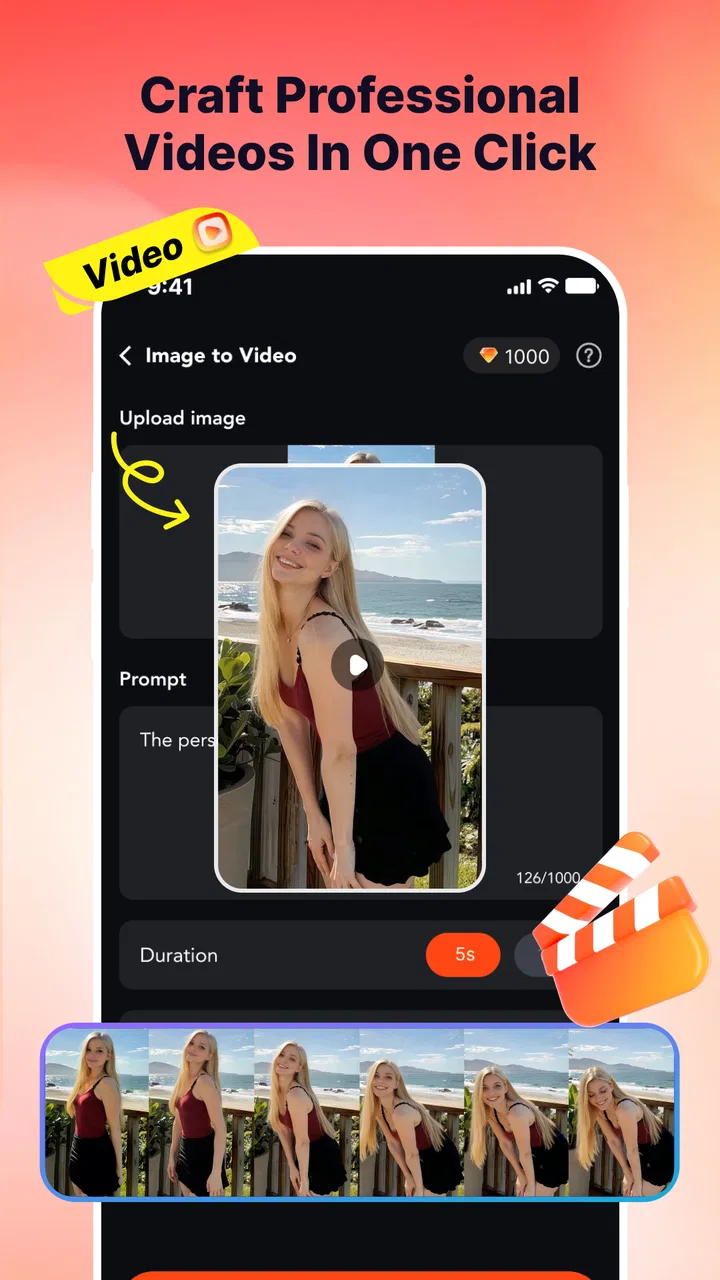
I approached Genloop: AI Video Generator as a simple lifestyle tool for turning still images into short AI-made videos. That focus sounds narrow, but it changes how the app should be judged. This is not a full video editor designed around timelines, sound mixing, captions, or precise cuts. Its appeal is the moment when an ordinary portrait, selfie, or piece of artwork becomes something that feels alive.
In my experience, that idea is both the app’s strongest point and its main limitation. When the source image is suitable, the result can be a quick way to add movement to a social post, personal project, or creative experiment. When the image needs careful control, the experience feels much less satisfying than working in a conventional editor. I would describe it as a lightweight AI video creation app rather than an all-purpose production suite.
The app is free to install, although it includes purchases ranging from $1.99 to $99.99 per item. It is listed for mature users aged 17 and above, runs on Android 7.0 or later, and comes from Developer of Vegas. Its current version is 1.0.1. Those details matter because someone using an older phone may be able to install it, but the quality of an AI video workflow can still depend heavily on the device, the source image, and how patiently the user is willing to review each result.
You May Also Like

 Pandora - Music & Podcasts
Pandora’s Music Is Easy to Start, but Harder to Recover
Pandora’s strength is its low-effort path from a seed to a station. Its weak spot is how much confidence it asks you to place in connection, setup, and quiet recovery.

 8 Ball Pool
 Is Built on Rivalries, Rematches, and Routine
A close look at the rivalries, rematches, shared routines, and unanswered safety questions that turn a quick pool match into a persistent mobile community.

 Samsung Music
’s Quiet Strength Is Playing What You Already Own
Its reach comes less from spectacle than from dependable access to a personal library. That simplicity is both the app’s strongest retention engine and its ceiling.

 AccuWeather: Weather Radar
AccuWeather Review: A Quick, Clear Forecast for Everyday Decisions
For everyday plans, the best forecast is the one you can understand quickly. AccuWeather makes rain timing, radar, and local conditions easy to act on, with a few trade-offs.

 Hill Climb Racing
Why Hill Climb Racing Still Turns Crashes Into One More Run
A tiny car, a bumpy hill and one more upgrade: Hill Climb Racing keeps resurfacing because its simple chaos makes every near-miss feel personal.

 AliExpress - Shopping App
AliExpress Makes Global Shopping Feel Personal, but Shoppers Bear the Risk
AliExpress turns a global marketplace into a pocket-sized discovery engine. Its reach is useful, its shopping loop compelling, and its trade-offs easy to miss.
More From Our News Desk
View All News


What the image-to-video idea really changes
The interesting capability here is not simply exporting a video. The useful part is the transformation from a static visual into a moving scene without asking the user to animate every element manually. A portrait can feel less like a photograph and more like a brief visual moment. Artwork can gain motion that would take considerably more effort in a traditional editor. A selfie can become a more expressive clip instead of remaining another still image in a camera roll.
That makes the app especially approachable for people who have an idea but no interest in learning keyframes, masks, motion paths, or editing terminology. I can see the attraction for a user who wants to try a creative effect during a spare moment: choose an image, let the app process it, inspect the result, and decide whether it is worth sharing or trying again.
The important distinction is that the source image does much of the creative work. A clear subject with a readable composition gives the animation a stronger starting point. A crowded image, a face partly hidden by another object, or artwork with many small details gives the system more chances to produce movement that feels awkward. In other words, the app does not remove the need for visual judgement; it shifts that judgement to the selection of the input.
I found that idea more useful than the usual promise of making “any photo” into a video. The practical question is not whether an image can be processed. It is whether the resulting movement supports what the image is trying to say. A subtle sense of life can improve a portrait. Uncontrolled motion can distract from it. For artwork, movement may add atmosphere, but it can also make a carefully balanced composition feel unstable.
Choosing material that gives the app a fair chance
My first recommendation is to prepare a small set of candidate images instead of committing to the first picture in the gallery. Look for one clear subject, enough empty space around important features, and a composition that still makes sense if movement is added. This is a more effective workflow than repeatedly blaming the generator for a weak result.
Portraits benefit from visible facial features and a straightforward pose. A selfie with strong lighting is usually a better experiment than a dim image with several people overlapping. For artwork, I would begin with a piece where the main shape is easy to recognize. Highly detailed textures can be attractive as still images but may become visually noisy once the app tries to animate them.
A less obvious advantage of this approach is that it encourages users to think in terms of motion-friendly composition. The best source is not always the most beautiful photograph. Sometimes a simpler image produces a more convincing clip because the app has fewer competing details to interpret. If you are creating a series, keeping the images visually consistent before processing them can also make the final collection feel more deliberate.
How the workflow feels in everyday use
The basic experience is easy to understand: start with a photo, portrait, selfie, or artwork, then use the app’s AI video process to create motion. I would not choose it for a project where every second must be planned in advance. Its value comes from reducing the distance between an idea and a first draft.
That first draft should be treated as a visual suggestion, not a finished production. Watch it carefully before sharing. Pay attention to whether the subject remains recognizable, whether the movement draws attention to the right place, and whether the clip still looks natural when viewed without the original image beside it. A result can seem impressive during the first glance and less convincing after several repetitions.
This review step is where the app demands more involvement than its simple premise suggests. AI generation may save manual animation work, but it does not replace selection and editing judgement. I would keep the original image untouched, save only the versions that genuinely improve it, and avoid building a whole post around a clip merely because it is technically animated.
Another practical point is to think about the destination before generating. A moving portrait intended for a quick social update has different needs from artwork being shown in a portfolio or personal presentation. Genloop is better suited to spontaneous, visual-first sharing than to a carefully controlled sequence that must match a brand style or a long-form story.
A realistic use case: bringing a personal memory to life
Imagine that I have an old family portrait or a favorite travel photograph and want to make it feel more present without turning it into a complicated editing project. I would choose the clearest version of the image, remove any duplicate or heavily blurred alternatives from consideration, and create a short AI video from the strongest candidate. Then I would watch the result with the sound off and ask whether the movement adds warmth or simply makes the memory look artificial.
If the clip works, it could fit naturally into a personal montage, a private message, or a small social post. The benefit is not cinematic quality. It is the ease of giving a still image a little more emotional presence. That is a modest but genuine use case, especially for someone who would otherwise never open a traditional editor.
The same workflow can work for an illustrator who wants to preview how a static piece might feel with motion. I would use the generated result as an idea board rather than as the final animation. It can suggest whether a visual deserves movement, but it should not be mistaken for precise control over an artist’s intended sequence.
Where the convenience starts to cost something
The first trade-off is control. A conventional mobile editor lets me decide exactly where a subject moves, how long a transition lasts, and which parts of the image remain still. Genloop’s attraction is that it handles much of that effort for me, but the same convenience means I have less direct influence over the final motion.
That matters when the image has a specific meaning. A casual selfie can tolerate an odd interpretation more easily than a family photograph, an illustration with intentional proportions, or an image being used for professional communication. If accuracy matters more than surprise, I would choose a tool with manual animation controls instead.
The second trade-off is repetition. AI video creation naturally invites experimentation, but repeated attempts can become frustrating if the user is expecting each version to improve in a predictable way. I would set a small personal limit: try a few carefully chosen source images or variations, keep the strongest result, and move on. Endless retries are not a substitute for a better starting image.
The purchase model is another consideration. The app is free, but optional items cost from $1.99 to $99.99 each. Before investing, I would first decide whether the basic image-to-video experience fits my needs. Someone who only wants to experiment occasionally may be comfortable staying within the free experience, while a frequent creator should examine the purchase prompts carefully and consider the total cost of repeated use rather than focusing on the smallest individual amount.
I also would not install it for children. The mature 17+ rating is a clear reason to keep the app within the appropriate age group, particularly when the workflow involves personal portraits and sharing creative results. Adults should still use ordinary care with images of other people and think before uploading anything they would not want processed in an online creative service.
How it compares with familiar alternatives
Compared with a standard photo editor, Genloop is more interesting when the goal is movement rather than correction. A photo editor is the better choice for cropping, color adjustments, retouching, and exact visual cleanup. If I need to make a picture look polished before animating it, I would prepare it elsewhere and then use Genloop for the motion experiment.
Compared with a traditional mobile video editor, this app is faster for a single still-image concept but weaker for structured storytelling. A timeline-based editor remains the better option for combining several clips, arranging a sequence, adding deliberate text, or matching a video to a specific rhythm. Genloop makes more sense at the beginning of that process, when I want to discover whether an image benefits from movement at all.
It also differs from manual animation tools. Those tools can be slower and more demanding, but they reward patience with repeatable results. Genloop’s appeal is the opposite: less setup, more immediate experimentation, and less certainty about exactly how the image will behave. Neither approach is universally better. The right choice depends on whether I value speed and surprise or precision and consistency.
Who will get the most from it
I think the best audience is curious creators who already have visual material and want a low-friction way to test motion. That includes people making personal posts, artists exploring presentation ideas, and casual users who find ordinary photo sharing too static. The app is also a reasonable starting point for someone intimidated by conventional video software.
The strongest results are likely to come from users willing to curate their inputs. Selecting a clean portrait, a focused selfie, or a visually simple artwork is not a minor detail; it is one of the main skills behind a satisfying outcome. Users who enjoy comparing variations and making creative choices will probably find more value than people looking for a one-tap guarantee.
I would skip it if my priority were professional consistency, exact animation direction, detailed editing, or a predictable production pipeline. I would also hesitate if I planned to process many images without first understanding how the purchase system affects regular use. In those situations, a conventional editor or a more control-oriented animation application would be a safer fit.
My practical advice before committing
Start with an image you can afford to treat as an experiment. Do not use an irreplaceable original as your only copy, and do not assume that a technically successful animation will automatically be emotionally or artistically successful. Keep the still image available so you can compare the two versions honestly.
Review the clip at normal speed and at least once without immediately sharing it. Look for distracting movement, changes that weaken the subject, and moments that feel less natural on repeat viewing. If the result is close but not right, change the source image before spending more. A different crop or a simpler composition may help more than another purchase.
It is also worth asking what role the generated video will play. If it is a playful visual accent, imperfections may be acceptable. If it represents someone else, supports an artwork, or communicates something important, I would prefer a tool that lets me protect the image’s original intent. That simple distinction prevents the app from being judged against a job it was never designed to do.
Final impression after focusing on its central idea
Genloop: AI Video Generator has a clear, appealing purpose: it gives still images a chance to become moving visuals with less manual effort than traditional animation. I like it most as a creative sketchbook. It can help me discover a new presentation for a portrait, selfie, or artwork, and it lowers the barrier for people who would never build an animation from scratch.
My reservations are equally clear. The generated result needs human review, the level of control is not comparable to a full editor, and the in-app purchase range makes it sensible to test the workflow before spending regularly. The mature age rating also means it should be approached as an adult-oriented creative tool, especially when personal images are involved.
The app has attracted over 50 thousand installs, yet its average rating is 1.8 from around 50 ratings, with a small number of written reviews. I would treat that as a reason to keep expectations measured rather than as a final verdict. For me, the deciding question is simple: do I want quick, AI-assisted motion from a single image, or do I need exact control over a finished video?
If the first answer sounds right, I would give Genloop a careful try using a strong, non-sensitive image and a limited experimental workflow. Its best effect is not replacing a video editor. It is helping a still image cross the small but meaningful distance between being looked at and feeling briefly alive.
FAQs for Genloop: AI Video Generator
01What is Genloop: AI Video Generator, and what can it do?
Genloop: AI Video Generator is an AI-powered mobile app designed to help users create short videos from text prompts, images, or other creative inputs. It can be useful for social media clips, promotional content, visual experiments, and quick story concepts. The exact tools may vary by version, but users should expect automated generation rather than the same level of control offered by professional desktop video editors.
02Is Genloop: AI Video Generator free to download and use?
The app may be free to download, but some features, export options, generation credits, or higher-quality results can require in-app purchases or a subscription. Before starting a project, check the pricing page, trial conditions, renewal terms, and credit limits carefully. Users should also confirm whether unused credits expire and whether removing watermarks is included in the selected plan.
03What kind of prompts or images produce the best results in Genloop?
For more consistent results, use clear and specific prompts that describe the subject, movement, setting, mood, camera style, and visual appearance. High-quality images with a visible main subject generally work better than blurry or crowded pictures. It is also helpful to generate short, simple scenes first, because complicated instructions, multiple characters, or fast action may produce unexpected movements or visual distortions.
04Does Genloop create videos quickly, and does it require an internet connection?
AI video generation normally depends on remote servers, so Genloop generally requires a stable internet connection for submitting prompts, uploading images, processing projects, and downloading finished videos. Processing time can vary according to video length, resolution, server demand, and your subscription level. A generation may take longer than expected during busy periods, and leaving the app before completion may affect how you monitor the project.
05Are videos created with Genloop suitable for commercial use?
Commercial use depends on Genloop’s current terms of service, the plan you choose, and the rights associated with any images, music, characters, logos, or prompts used in a project. AI-generated content may still raise copyright, trademark, privacy, or publicity concerns. Before publishing advertisements or monetized videos, review the app’s licensing rules and make sure every source asset is legally cleared for your intended use.
Pros
- Creates engaging videos from simple text prompts.
- Useful for social media clips
- ads
- and creative concepts.
- AI generation can speed up early video production.
- Supports experimentation with different visual styles.
- Helpful for users without advanced editing experience.
Cons
- Results may vary widely depending on prompt quality.
- Generated clips can include visual or motion inconsistencies.
- Advanced features may require a paid subscription.
- Rendering times can increase for complex video requests.
- Limited control compared with professional video editors.

Genloop: AI Video Generator
Gallery